
Destructuring in JavaScript
JavaScript Destructuring: Stop Writing Repetitive Code**
If you’ve ever found yourself writing const name = user.name or const first = arr[0] over and over again, you’re doing extra work.
JavaScript has a beautiful feature called destructuring that lets you unpack values from arrays and properties from objects into distinct variables—in one clean line.
Let’s dive into what destructuring means, how it works with arrays and objects, setting default values, and why you should start using it today.
What Destructuring Means
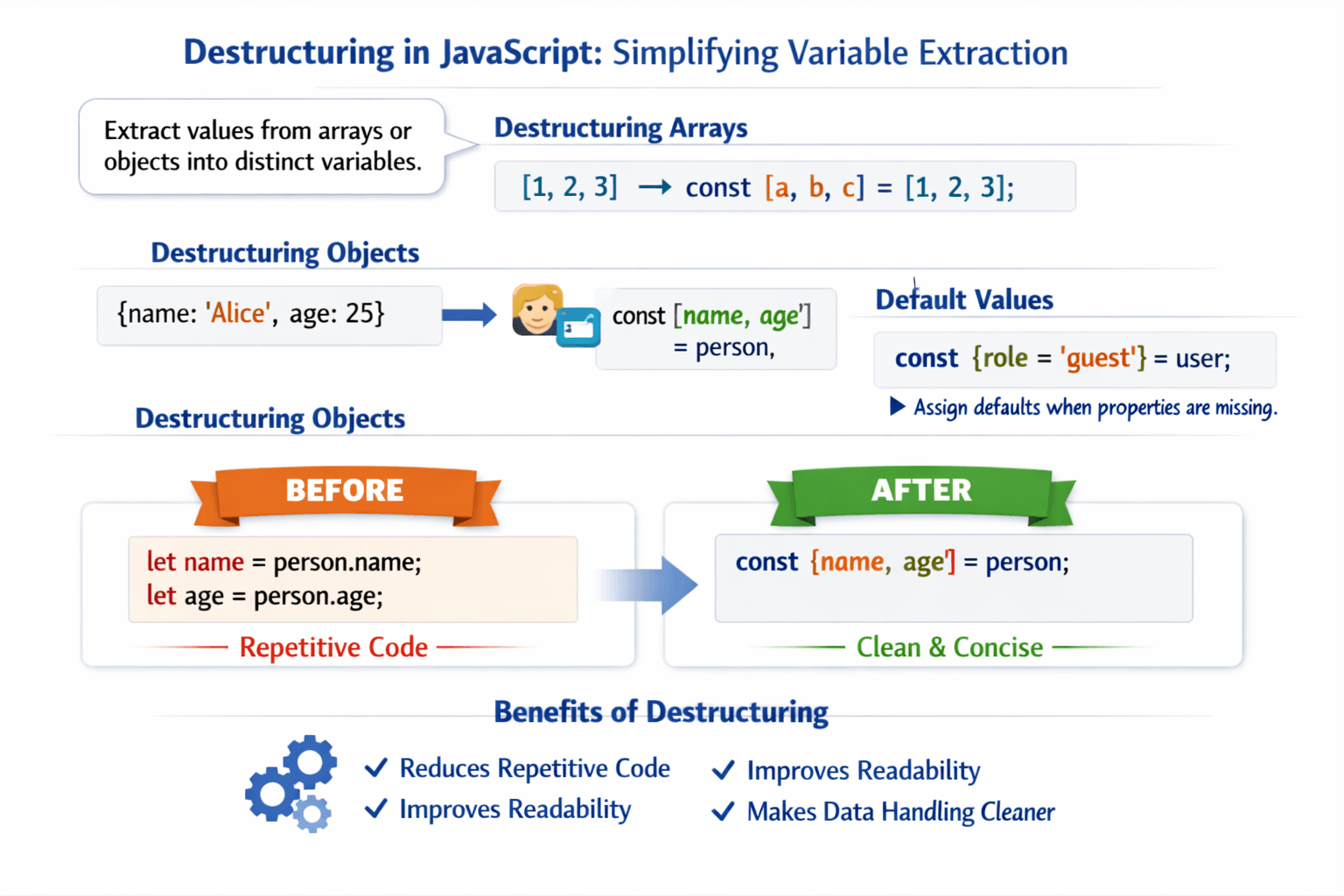
Destructuring is a syntax that allows you to extract data from arrays or objects and assign them to variables using a pattern that mirrors the original structure.
Think of it as "unpacking" your data.
Destructuring Arrays
With arrays, destructuring pulls values by their position.
Without Destructuring (The Old Way)
const colors = ["red", "green", "blue"];

const first = colors[0];
const second = colors[1];
const third = colors[2];

console.log(first, second, third); // red green blue
With Destructuring
const colors = ["red", "green", "blue"];
const [first, second, third] = colors;

console.log(first, second, third); // red green blue
You can also skip items using empty commas:
const [, , third] = ["red", "green", "blue"];
console.log(third); // blue
Destructuring Objects
Object destructuring uses the property names—not order.
Before Destructuring
const user = {
  name: "Alice",
  age: 28,
  city: "Paris"
};

const name = user.name;
const age = user.age;
const city = user.city;

console.log(name, age, city); // Alice 28 Paris
After Destructuring
const user = {
  name: "Alice",
  age: 28,
  city: "Paris"
};

const { name, age, city } = user;

console.log(name, age, city); // Alice 28 Paris
You can also assign to different variable names:
const { name: userName, age: userAge } = user;
console.log(userName, userAge); // Alice 28
Default Values
What if a property or array element is missing? Destructuring lets you set default values to avoid undefined.
Arrays with defaults
const [a = 1, b = 2] = [10];
console.log(a, b); // 10 2 (only a gets 10, b uses default)
Objects with defaults
const { name, role = "guest" } = { name: "Bob" };
console.log(name, role); // Bob guest
Suggestions for Using Destructuring
Use object destructuring when you need multiple properties from the same object.
Use array destructuring for swapping variables or getting first/second items.
Always provide defaults when data might be missing.
Destructure function parameters to make functions self-documenting.
Avoid over-destructuring – don’t go more than 2 levels deep without a good reason.
Final Thought
Destructuring isn’t just a "cool trick." It’s a fundamental tool that makes your JavaScript cleaner, safer, and more expressive.