
Sessions vs JWT vs Cookies
Understanding Authentication Approaches
If you're confused about the differences between sessions, JWT, and cookies - you're not alone. These terms are often mixed up, and many developers struggle to understand how they relate.
Here's the truth: Cookies are a storage mechanism. Sessions and JWT are authentication strategies. They often work together.
Let me clear up the confusion once and for all.
First, Understand the Difference
| Term | What it is | Analogy |
|---|---|---|
| Cookie | A storage mechanism (client-side) | A wallet you carry |
| Session | Server-side authentication state | A VIP card checked against a list at the door |
| JWT | Self-contained token | A passport with all your info embedded |
Key insight: You can store a session ID in a cookie. You can also store a JWT in a cookie. Cookies are just the delivery method.
What are Cookies?
Cookies are small pieces of data (max 4KB) that browsers store and automatically send with every request to the same domain.
How Cookies Work?
Server sets cookie via response header: Set-Cookie: userId=123; HttpOnly; Secure; Max-Age=3600
Browser stores the cookie
Browser automatically sends cookie with every subsequent request: Cookie: userId=123
Cookie Attributes (Important!)
res.cookie("token", "abc123", {
  httpOnly: true,   // Can't be accessed by JavaScript (prevents XSS)
  secure: true,     // Only sent over HTTPS
  sameSite: "strict", // Protects against CSRF
  maxAge: 3600000,  // 1 hour expiration
  domain: ".example.com" // Available to subdomains
});
What Cookies Are NOT
Not secure by default - They need proper flags (HttpOnly, Secure, SameSite)
Not for large data - 4KB limit
Not cross-domain - They belong to specific domains

How Session Authentication Works
Client sends login credentials to server
└─ POST /login with username + passwordServer verifies credentials against database
└─ If valid, creates a unique session IDServer stores session data (in memory/Redis/DB)
└─ Example: { userId: 123, role: "admin", expires: "2024-01-01" }Server sends session ID to client via cookie
└─ Set-Cookie: sessionId=abc123; HttpOnly; SecureBrowser stores cookie automatically
Client includes cookie in all subsequent requests
└─ Cookie: sessionId=abc123Server reads cookie, looks up session data
└─ Finds userId, role, etc. from session storeServer responds with requested data
└─ No need to re-authenticate for each requestOn logout, server destroys session
└─ Client cookie becomes invalid
Session Code Example
import express from "express";
import session from "express-session";
import MongoStore from "connect-mongo";

const app = express();

// Session configuration
app.use(session({
  secret: "your-secret-key",
  resave: false,
  saveUninitialized: false,
  store: MongoStore.create({
    mongoUrl: "mongodb://localhost:27017/sessions"
  }),
  cookie: {
    httpOnly: true,
    secure: process.env.NODE_ENV === "production",
    maxAge: 1000 * 60 * 60 * 24 // 24 hours
  }
}));

// Login route
app.post("/login", async (req, res) => {
  const { username, password } = req.body;

  // Verify user (check database)
  const user = await User.findOne({ username });

  if (user && await bcrypt.compare(password, user.password)) {
    // Store user info in session
    req.session.userId = user._id;
    req.session.username = user.username;
    req.session.role = user.role;

    res.json({ message: "Logged in successfully" });
  } else {
    res.status(401).json({ error: "Invalid credentials" });
  }
});

// Protected route
app.get("/profile", (req, res) => {
  // Check if session exists
  if (!req.session.userId) {
    return res.status(401).json({ error: "Not authenticated" });
  }

  res.json({
    userId: req.session.userId,
    username: req.session.username
  });
});

// Logout
app.post("/logout", (req, res) => {
  req.session.destroy((err) => {
    if (err) {
      return res.status(500).json({ error: "Logout failed" });
    }
    res.clearCookie("connect.sid");
    res.json({ message: "Logged out" });
  });
});
Session Storage Options
| Storage | Use Case |
|---|---|
| Memory (default) | Development only (doesn't scale) |
| Redis | High performance, production |
| MongoDB | Good for smaller apps |
| PostgreSQL | If already using Postgres |
Pros & Cons of Sessions
| Pros | Cons |
|---|---|
| ✅ Simple to implement | ❌ Server needs to store sessions |
| ✅ Easy to invalidate | ❌ Doesn't scale horizontally easily |
| ✅ Small client payload | ❌ Requires shared session store |
| ✅ Built-in CSRF protection (with SameSite) | ❌ Can be slower (database lookup) |
What is JWT (JSON Web Token)?
JWT is a stateless authentication mechanism. The token contains all necessary user information, signed by the server. No server-side storage required.
JWT Structure
A JWT looks like this:
eyJhbGciOiJIUzI1NiIsInR5cCI6IkpXVCJ9.eyJ1c2VySWQiOiIxMjMiLCJyb2xlIjoidXNlciIsImlhdCI6MTY5MDAwMDAwMCwiZXhwIjoxNjkwMDAzNjAwfQ.SflKxwRJSMeKKF2QT4fwpMeJf36POk6yJV_adQssw5c
Pros & Cons of JWT
| Pros | Cons |
|---|---|
| ✅ Stateless (scales easily) | ❌ Can't invalidate easily (until expiry) |
| ✅ No database lookup needed | ❌ Larger payload size |
| ✅ Works across domains (CORS) | ❌ Security depends on secret management |
| ✅ Mobile-friendly | ❌ Token theft is harder to revoke |
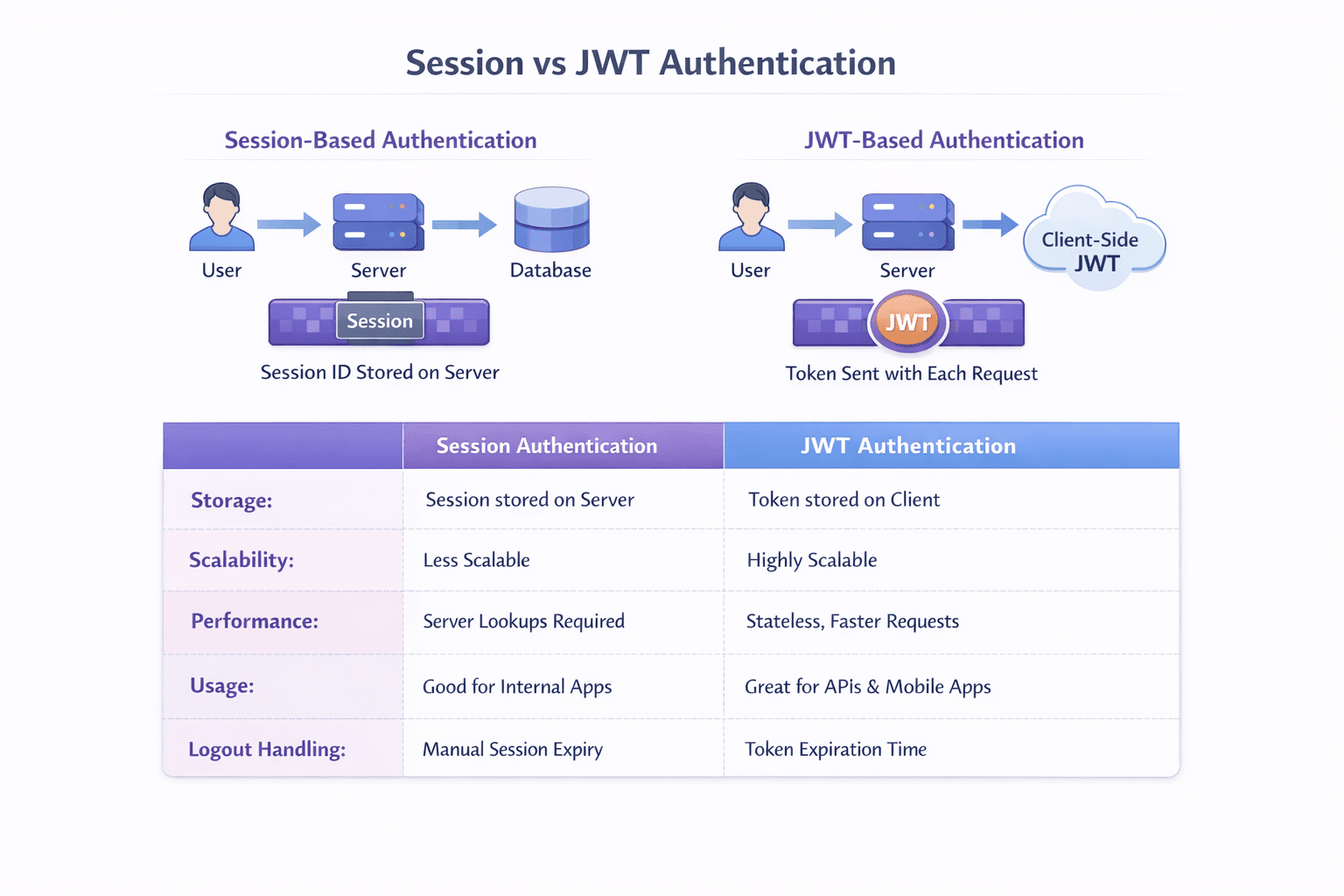
Head-to-Head Comparison
Sessions vs JWT
| Aspect | Sessions | JWT |
|---|---|---|
| State | Server-side state | Stateless |
| Storage | Server (DB/Redis) | Client |
| Scalability | Needs shared session store | Horizontally scalable |
| Invalidation | Instant (delete session) | Until expiry (or use blacklist) |
| Payload Size | Small (session ID) | Larger (all user data) |
| Performance | Database lookup each request | Verify signature (fast) |
| Logout | Simple (destroy session) | Complex (must clear client token) |
| CSRF Protection | Built-in (with SameSite) | Must implement manually |
When to Use Sessions
// ✅ GOOD USE CASES FOR SESSIONS

// 1. Traditional web apps (server-rendered)
app.get("/dashboard", (req, res) => {
  if (req.session.userId) {
    res.render("dashboard", { user: req.session.user });
  }
});

// 2. When you need instant logout/revocation
app.post("/admin/block-user", (req, res) => {
  sessionStore.destroy(userSessionId); // Immediately blocks access
});

// 3. When storing large amounts of user data
req.session.userPreferences = { theme: "dark", language: "es" }; // Not in cookie

// 4. Banking/financial apps (higher security requirements)
When to Use JWT
// ✅ GOOD USE CASES FOR JWT

// 1. REST APIs (stateless)
app.get("/api/users", authenticateToken, (req, res) => {
  // No session lookup needed
});

// 2. Microservices architecture
Service A: Generate token with user info
Service B: Verify token without calling auth service

// 3. Mobile applications
// Tokens work well with mobile's lack of cookie support

// 4. Single Page Applications (SPA)
// Works with localStorage or cookies

// 5. Third-party API access
const apiToken = jwt.sign({ clientId: "abc123" }, SECRET);
When to Use Both Together
Many production apps combine both:
javascript
// Hybrid approach: JWT stored in HTTP-only cookie
app.post("/login", async (req, res) => {
  const token = jwt.sign({ userId: user.id }, SECRET, { expiresIn: "15m" });
  const refreshToken = jwt.sign({ userId: user.id }, REFRESH_SECRET, { expiresIn: "7d" });

  // Store tokens in HTTP-only cookies (secure against XSS)
  res.cookie("accessToken", token, { httpOnly: true, secure: true });
  res.cookie("refreshToken", refreshToken, { httpOnly: true, secure: true });

  // Also store session in Redis for revocation ability
  await redis.set(`session:${user.id}`, token, "EX", 900);
});
Security Considerations
Common Attacks & Mitigations
| Attack | Sessions | JWT |
|---|---|---|
| XSS | HttpOnly cookie protects | localStorage vulnerable; use HttpOnly cookie |
| CSRF | SameSite cookie + CSRF tokens | SameSite cookie + CSRF tokens |
| Replay | Session ID changes on login | Short expiration + refresh tokens |
| Theft | Can revoke session | Can't revoke until expiry (use refresh token rotation) |

Quick Reference Card
javascript
// SESSIONS - Server-side storage
// Pros: Easy logout, small cookie, CSRF protection
// Cons: Needs database, harder to scale
app.use(session({ secret: "key", store: new RedisStore() }));
req.session.userId = userId;

// JWT - Client-side token
// Pros: Stateless, scales well, works across domains
// Cons: Can't revoke easily, larger payload
const token = jwt.sign({ userId }, SECRET, { expiresIn: "1h" });
jwt.verify(token, SECRET);

// COOKIES - Storage mechanism (used with both)
res.cookie("name", "value", { httpOnly: true, secure: true });
req.cookies.name
Final Summary
| Use Case | Recommendation |
|---|---|
| Traditional web app (Rails/Django/Express with views) | Sessions in HTTP-only cookies |
| Modern SPA (React/Vue/Angular) on same domain | JWT in HTTP-only cookie |
| REST API for multiple clients | JWT in Authorization header |
| Microservices architecture | JWT for internal communication |
| Mobile app backend | JWT with refresh tokens |
| Banking/financial app | Sessions with strict security |
| Simple personal project | Either works; choose simpler option |
The golden rule: Use HTTP-only, Secure, SameSite cookies regardless of whether you store a session ID or JWT. Store as little sensitive data as possible. Always use HTTPS in production.