
JavaScript Map and Set
Better Ways to Store Data
For years, JavaScript developers relied on plain objects {} for key-value storage and arrays [] for lists. But objects and arrays have limitations.
Enter Map and Set – two powerful data structures introduced in ES6 that solve real problems.
Let’s explore what they are, how they differ from traditional structures, and when you should use them.
What is a Map?
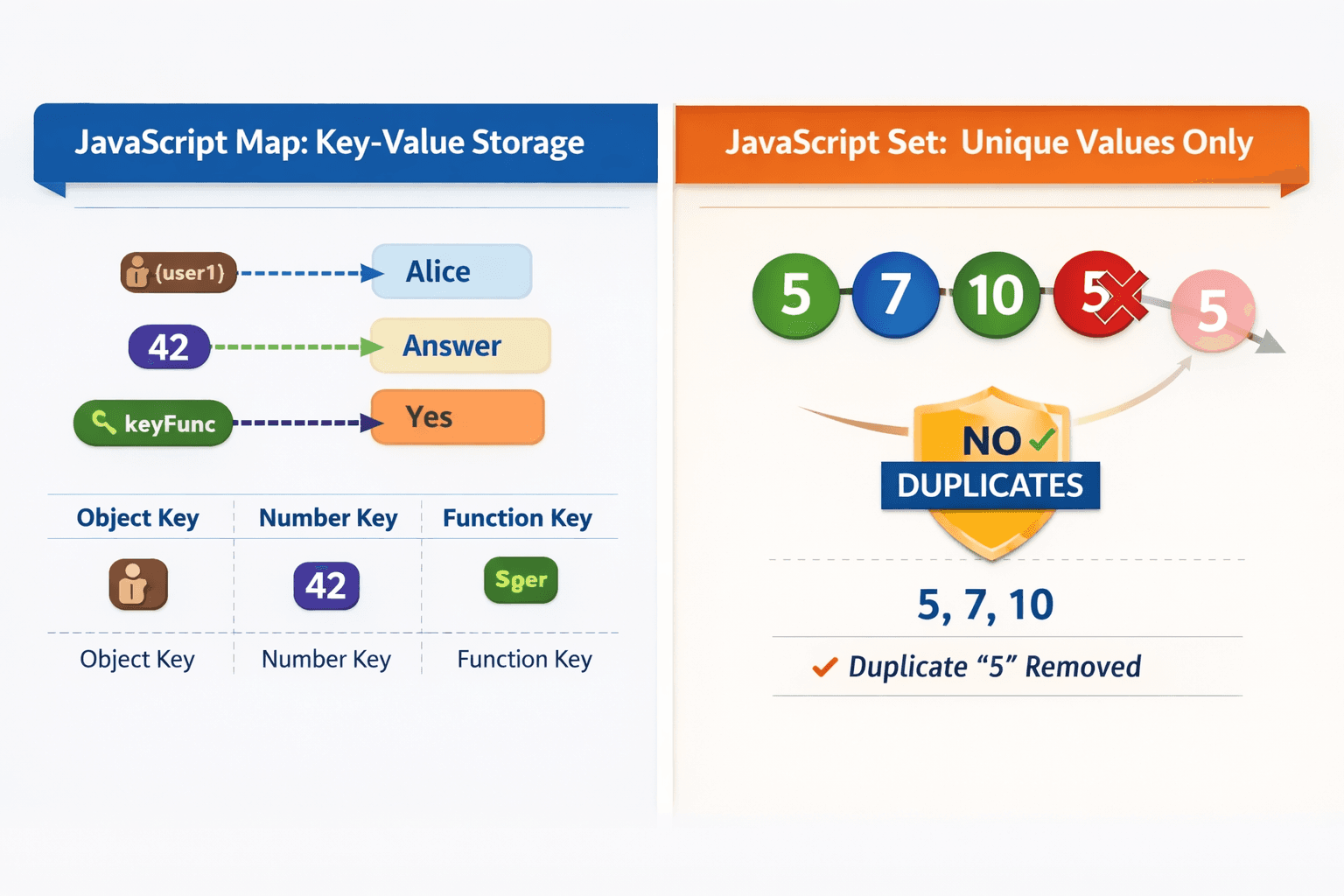
A Map is a collection of key-value pairs where keys can be any data type (objects, functions, numbers, strings, etc.)
No guartee order of key, key can be any orders, may be sorted or not sorted
they remember the original insertion order.
The Problem with Plain Objects
Traditional objects have two major flaws:
Keys are always strings (or symbols). If you use a number or object as a key, it gets converted to a string.
Prototype chain pollution – properties like
toStringcan accidentally interfere with your data.
// The problem with objects
const obj = {};
obj[1] = "number one";
obj["1"] = "string one"; // Overwrites the previous!

console.log(obj[1]); // "string one" - lost the number key

// Object keys cause issues
const user = { name: "Alice" };
obj[user] = "user data";
console.log(obj["[object Object]"]); // "user data" - key got stringified!
How Map Solves This
const map = new Map();

// Keys keep their original type
map.set(1, "number one");
map.set("1", "string one");
map.set({ name: "Alice" }, "user data");

console.log(map.get(1));  // "number one" - separate entry
console.log(map.get("1")); // "string one" - separate entry

// Object key works as expected
const alice = { name: "Alice" };
map.set(alice, { email: "alice@example.com" });
console.log(map.get(alice)); // { email: "alice@example.com" }
Map Methods at a Glance
| Method | Description |
|---|---|
set(key, value) |
Adds or updates an entry |
get(key) |
Retrieves a value |
has(key) |
Checks if key exists |
delete(key) |
Removes an entry |
clear() |
Removes all entries |
size |
Returns number of entries |
const scores = new Map();
scores.set("Alice", 95);
scores.set("Bob", 87);

console.log(scores.has("Alice")); // true
console.log(scores.size);         // 2
scores.delete("Bob");
console.log(scores.size);         // 1
What is a Set?
A Set is a collection of unique values – no duplicates allowed. Values can be of any type, and insertion order is preserved.
The Problem with Arrays
Arrays allow duplicates, which often requires extra code to handle:
// Array with duplicates
const tags = ["js", "react", "js", "node", "react", "css"];

// Removing duplicates manually
const uniqueTags = [];
for (const tag of tags) {
  if (!uniqueTags.includes(tag)) {
    uniqueTags.push(tag);
  }
}
console.log(uniqueTags); // ["js", "react", "node", "css"] - 4 lines of code
How Set Solves This
const tags = ["js", "react", "js", "node", "react", "css"];
const uniqueTags = new Set(tags);

console.log(uniqueTags); // Set(4) { "js", "react", "node", "css" }

// Convert back to array if needed
console.log([...uniqueTags]); // ["js", "react", "node", "css"]
One line. No duplicates. Perfect.
Set Methods at a Glance
| Method | Description |
|---|---|
add(value) |
Adds a value (ignores duplicates) |
has(value) |
Checks if value exists |
delete(value) |
Removes a value |
clear() |
Removes all values |
size |
Returns number of values |
const fruits = new Set();
fruits.add("apple");
fruits.add("banana");
fruits.add("apple"); // ignored - already exists

console.log(fruits.size); // 2
console.log(fruits.has("banana")); // true

fruits.delete("banana");
console.log(fruits.size); // 1
Map vs Object
| Feature | Map | Object |
|---|---|---|
| Key types | Any (objects, functions, primitives) | Strings & Symbols only |
| Key order | Preserves insertion order | No guaranteed order (for non-integer keys) |
| Size property | map.size |
Object.keys(obj).length |
| Performance | Better for frequent additions/removals | Slower for large dynamic operations |
| Prototype | No prototype pollution | Has prototype chain |
| Iteration | Directly iterable (for...of) |
Needs Object.entries() |
Set vs Array
| Feature | Set | Array |
|---|---|---|
| Duplicates | Not allowed | Allowed |
| Order | Preserves insertion order | Preserves order |
| Access by index | No (use has() or iteration) |
Yes (arr[0]) |
| Performance | Faster for existence checks (has()) |
Slower (includes() or indexOf()) |
| Use case | Uniqueness & membership | Ordered lists with possible duplicates |
Use Map when:
Keys are unknown until runtime (dynamic)
Keys need to be objects, numbers, or functions
You need frequent addition and removal of key-value pairs
Order of insertion matters
You want to avoid prototype chain issues
frequency / count / number of times
occurrence(s)
mapping / associate / pairing
store extra info for each element
group by something (e.g., anagrams grouping)
find most / least frequent element
accumulate sums per category (e.g., total score per player)
store index/position of elements
Use Set when:
You need a collection of unique values
You frequently check if a value exists
You want to remove duplicates from an array
Order of insertion matters
unique / distinct
duplicate / remove duplicates
exists / contains / present
intersection / union / difference of elements
first repeating / first non-repeating
already seen before?
check membership in O(1)