
Async Code in Node.js: Callbacks vs Promises
"Why does my code run out of order?" - Every Node.js beginner, 5 minutes in.
If you've written JavaScript, you've encountered the confusion. You log a variable, but it's undefined. You fetch data, but the next line runs before the data arrives.
This isn't a bug. It's Node.js working exactly as designed.
Let me explain why async code exists, how callbacks work, why they become a nightmare, and how promises save your sanity.
Why Async Code Exists in Node.js
Node.js is single-threaded. One thread. One thing at a time.
Imagine a restaurant with one chef. If that chef takes 10 minutes chopping onions, every other order waits. Customers leave angry.
Traditional web servers (Apache, older Rails) created a new thread for each request. More requests = more threads = more memory = slower system.
Node.js does something different. The single chef starts chopping onions, but instead of waiting, they say "I'll check back in 10 minutes" and starts cooking another order.
This is async. Start a slow operation (file read, database query, network request), don't wait, move on. When the slow operation finishes, come back to it.
The Problem Async Solves
// Without async - this blocks everything
const data = fs.readFileSync('/big-file.txt'); // Waits 2 seconds
console.log(data); // Then runs
console.log('Next operation'); // Then runs

// During those 2 seconds, the server handles ZERO other requests
// With async - non-blocking
fs.readFile('/big-file.txt', (err, data) => {
  console.log(data); // Runs after 2 seconds
});
console.log('Next operation'); // Runs immediately

// During those 2 seconds, the server handles OTHER requests
The insight: Async code doesn't make operations faster. It makes the system more responsive by not wasting time waiting.
Callback-Based Async Execution
Callbacks are functions passed as arguments to be executed later.
The Simplest Example
javascript
function greet(name, callback) {
  console.log(`Hello ${name}`);
  callback();
}

function sayGoodbye() {
  console.log('Goodbye!');
}

greet('Alice', sayGoodbye);
// Output:
// Hello Alice
// Goodbye!
Real-World: Reading a File
This is where async actually matters:
const fs = require('fs');

console.log('1. Starting to read file...');

fs.readFile('./data.txt', 'utf8', (err, data) => {
  if (err) {
    console.error('Error:', err.message);
    return;
  }
  console.log('3. File content:', data);
});

console.log('2. This runs while file is being read');
console.log('4. Actually this runs too, before the file is done');
Output:
Starting to read file...
This runs while file is being read
Actually this runs too, before the file is done
File content: Hello World
Step-by-Step Callback Flow
text
TIMELINE OF ASYNC FILE READ:

Time 0ms:  Call fs.readFile()
           │
           ├─> Node.js asks the operating system: "Read this file"
           ├─> Node.js continues running next lines
           │
Time 1ms:  console.log('2...') runs
Time 2ms:  console.log('4...') runs
Time 3ms:  Node.js event loop is idle, waiting
           │
Time 150ms: Operating system says: "File is ready"
           │
           ├─> Node.js places callback in the event queue
           ├─> Event loop picks up the callback
           │
Time 151ms: Callback executes
           console.log('3...') runs
How Callbacks Work Under the Hood
When you call fs.readFile(), Node.js:
Delegates to libuv (the C++ library that handles async operations)
Registers your callback in a queue associated with that operation
Returns immediately - your code continues
When the OS finishes reading the file, libuv adds the callback to the event loop
Next event loop tick executes your callback with the result
The key insight: Your callback sits in memory, waiting, while other code runs.
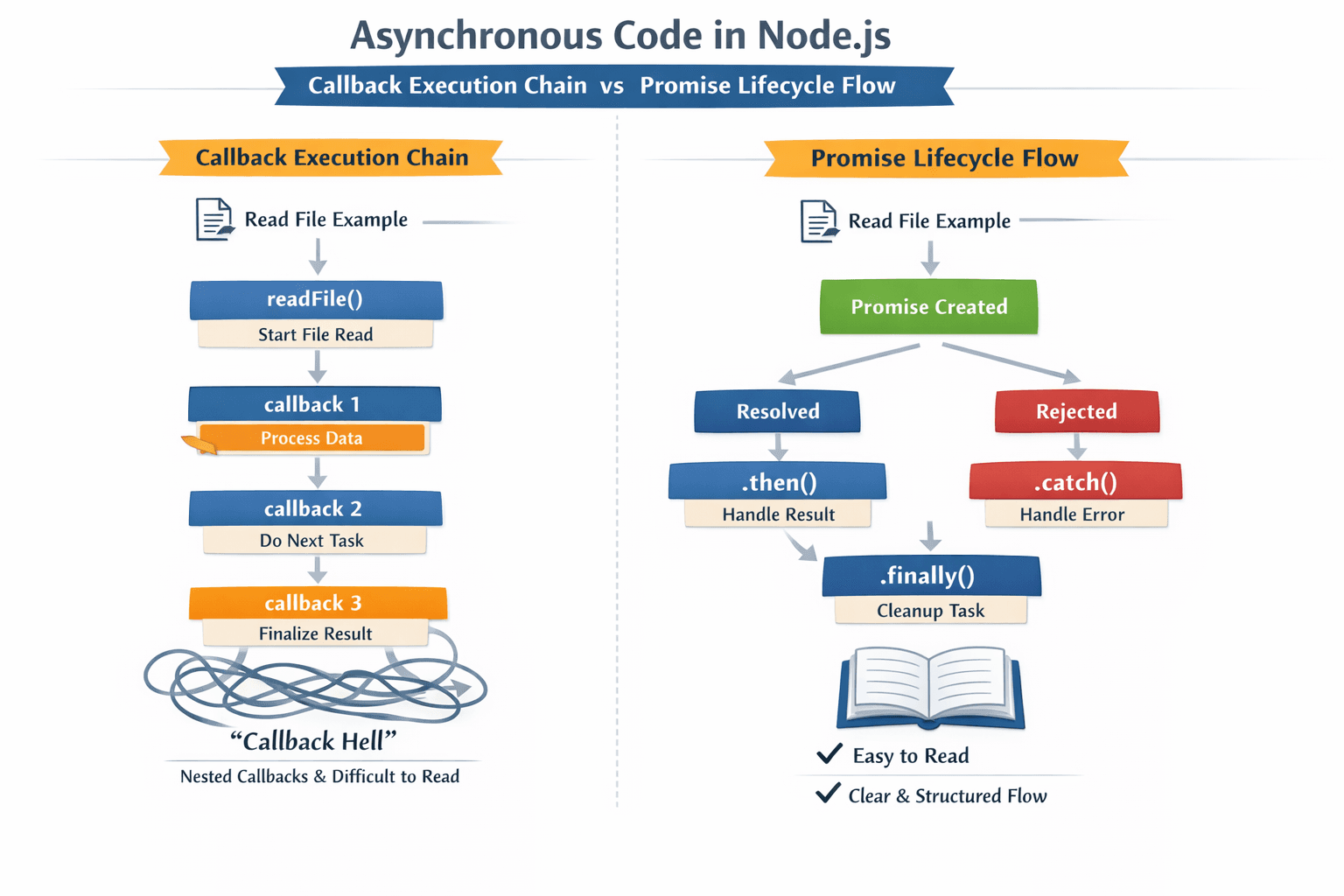
The Problem with Nested Callbacks (Callback Hell) Async operations often depend on each other. Read user → then read their profile → then read their posts.
This creates nesting:
javascript // The nightmare - Callback Hell fs.readFile('user.json', 'utf8', (err, userData) => { if (err) { console.error('Failed to load user:', err); return; }
const user = JSON.parse(userData);
fs.readFile(profiles/${user.profileId}.json, 'utf8', (err, profileData) => { if (err) { console.error('Failed to load profile:', err); return; }
const profile = JSON.parse(profileData);

fs.readFile(`posts/${profile.postsFile}`, 'utf8', (err, postsData) => {
  if (err) {
    console.error('Failed to load posts:', err);
    return;
  }

  const posts = JSON.parse(postsData);

  // Finally, we have all the data
  console.log('User:', user.name);
  console.log('Profile:', profile.bio);
  console.log('Posts:', posts.length);

  // But wait, we need to save the result...
  fs.writeFile('result.json', JSON.stringify({ user, profile, posts }), (err) => {
    if (err) {
      console.error('Failed to save:', err);
      return;
    }
    console.log('All done!');
  });
});
}); });
Why Callback Hell is Terrible Problem Why It Hurts Pyramid shape Code grows rightward, not downward Error handling repetition if (err) everywhere, easy to forget Inversion of control You give your callback to someone else - what if they call it twice? Never call it? Poor readability Flow of logic is hard to trace Hard to refactor Moving one async operation means restructuring everything
Promise-Based Async Handling
A Promise is an object representing a future value. It's a placeholder for "I don't have the result yet, but I will."
Promise States

###The Same File Reading with Promises
const fs = require('fs').promises; // Node.js has built-in promise version

console.log('1. Starting...');

fs.readFile('user.json', 'utf8') .then(userData => { console.log('2. Got user data'); const user = JSON.parse(userData); return fs.readFile(`profiles/\({user.profileId}.json`, 'utf8'); }) .then(profileData => { console.log('3. Got profile data'); const profile = JSON.parse(profileData); return fs.readFile(`posts/\){profile.postsFile}.json`, 'utf8'); }) .then(postsData => { console.log('4. Got posts data'); const posts = JSON.parse(postsData); console.log('Done! Posts count:', posts.length); }) .catch(err => { console.error('Something failed:', err.message); });

console.log('5. This runs before any file operations complete');
Benefits of Promises
Flat Chain, Not Nested Pyramid
Promises keep your code at one indentation level. Each async step is a new .then(), not another level inside.Single Error Handler
One .catch() at the end catches errors from any step in the chain. No more if (err) after every operation.Composable
Promises can be combined:
javascript
// Run multiple async operations in parallel
Promise.all([
  readFilePromise('users.json'),
  readFilePromise('posts.json'),
  readFilePromise('comments.json')
]).then(([users, posts, comments]) => {
  // All three files are loaded
});

// Race - first to finish wins
Promise.race([
  fetchFromAPI1(),
  fetchFromAPI2(),
  fetchFromAPI3()
]).then(fastestResult => {
  // Use the fastest response
});
4. Predictable Behavior
A promise only resolves once
Never both resolve and reject
Callbacks are always async (even if resolved immediately)
5. Then Returns a New Promise
This enables chaining. Each .then() returns a new promise, so you can keep adding operations.
javascript
const promise = readFilePromise('data.txt')
  .then(JSON.parse)
  .then(data => data.users)
  .then(users => users.filter(u => u.active))
  .then(activeUsers => activeUsers.length);

// promise is a Promise that will eventually have the count
Beyond Promises: Async/Await
While promises are great, modern Node.js uses async/await (syntactic sugar over promises):
// The same logic, now readable like synchronous code async function loadUserData() { try { const userData = await fs.readFile('user.json', 'utf8'); const user = JSON.parse(userData);
const profileData = await fs.readFile(`profiles/${user.profileId}.json`, 'utf8');
const profile = JSON.parse(profileData);

const postsData = await fs.readFile(`posts/${profile.postsFile}.json`, 'utf8');
const posts = JSON.parse(postsData);

return { user, profile, posts };
} catch (err) { console.error('Failed:', err.message); throw err; } }