
Hunting the Linux File System:
What I Discovered Under the Hood
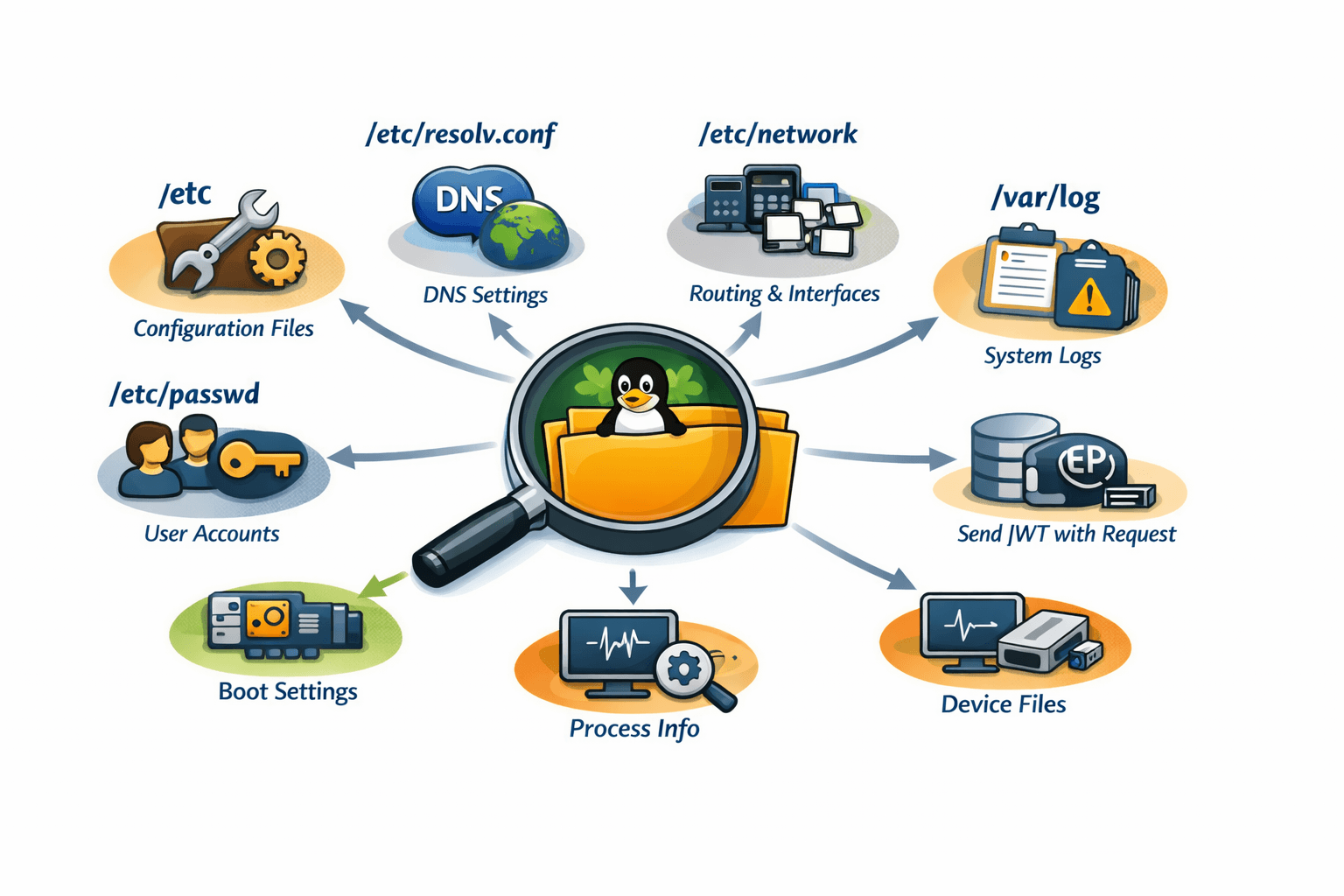
"Everything is a file" - you've heard it before. But until you start digging through /proc, /sys, and /etc, you don't really understand what it means.
I spent time investigating Linux from the inside out - not running commands as an exercise, but actually understanding why things are where they are and how they control system behavior. Here are my most interesting discoveries.
Finding 1: /etc/resolv.conf - The DNS Lie That Works Perfectly What it is: A plain text file that tells your system which DNS servers to query.
Why it exists: Before this file, DNS configuration was scattered. Now every application from ping to your browser knows exactly where to ask for domain resolution.
The interesting discovery: On most modern Linux systems with NetworkManager or systemd-resolved, /etc/resolv.conf is actually a symbolic link to a dynamically generated file. What you're reading isn't real - it's a snapshot of current state.

bash
This file is actually a symlink to generated config
ls -la /etc/resolv.conf
lrwxrwxrwx ... /etc/resolv.conf -> ../run/systemd/resolve/stub-resolv.conf
Why this matters: The system is lying to you - but intentionally. It maintains backward compatibility (apps still read /etc/resolv.conf) while allowing modern dynamic configuration. This is Linux's superpower: abstraction layers that preserve decades of compatibility.
What I learned: Never hardcode DNS settings by overwriting this file directly. Use systemd-resolved or NetworkManager APIs. The file is a view, not a source of truth.
Finding 2: /proc/[pid]/maps - Every Byte of Memory, Exposed What it is: A text file showing exactly how a process's virtual memory is laid out - which libraries are loaded, where the stack is, which regions are executable.
Why it exists: Debugging crashes and memory leaks without this would be guesswork. It answers: "What is this process actually doing in memory?"
The interesting discovery: You can see every shared library a running process has loaded, including their exact memory addresses. For a web server, you'll see libc.so, libssl.so, your app code, and even the dynamic linker itself.
Excerpt from /proc/1234/maps
7f8a2c000000-7f8a2c123000 r-xp 00000000 08:01 12345 /usr/lib/x86_64-linux-gnu/libc.so.6 7f8a2c123000-7f8a2c2c0000 ---p 00123000 08:01 12345 /usr/lib/x86_64-linux-gnu/libc.so.6 Why this matters: Those r-xp flags tell you:
r = readable
x = executable (code sections)
p = private (copy-on-write)
If you see a stack region marked executable, that's suspicious - potential buffer overflow exploitation. Security tools read these exact files to detect anomalies.
What I learned: The operating system has no secrets from you. Every byte of memory for every process is documented in plain text in /proc. This is transparency at a level Windows and macOS don't provide.
Finding 3: /proc/sys/net/ipv4/ip_forward - The Single Bit That Turns Your PC Into a Router What it is: A file containing either 0 or 1 that controls whether your Linux machine forwards IP packets between network interfaces.
Why it exists: Linux is used in everything from toasters to core routers. This one file toggles between "endpoint mode" and "router mode."
The interesting discovery: This isn't just a configuration file - it's a live kernel parameter. You can change it and routing behavior changes instantly, without restarting anything:
Turn on routing instantly
echo 1 > /proc/sys/net/ipv4/ip_forward Why this matters: This is the difference between a "client" and an "infrastructure" device. Most home routers run Linux, and this file is why they work. Your laptop can become a router in one command.
What I learned: The Linux kernel exposes its internal boolean flags as files you can write to. /proc/sys is essentially a control panel for the running kernel. Network namespaces, firewall rules, TCP parameters - all tunable in real-time through virtual files.
Finding 4: /var/log/auth.log - The Silent Witness to Every Login Attempt What it is: The system's authentication diary. Every successful and failed login, every sudo command, every SSH connection attempt.
Why it exists: When something goes wrong with permissions, this is where you find out why. When someone breaks in, this is where you see how.
The interesting discovery: The level of detail is astonishing. For every SSH login, you'll see:
Source IP address (even if behind NAT)
Which authentication method (password, key, keyboard-interactive)
Exactly which user was targeted
Timestamp to the microsecond
text Mar 15 03:22:14 server sshd[24567]: Failed password for root from 203.0.113.45 port 54321 ssh2 Mar 15 03:22:15 server sshd[24567]: Connection closed by authenticating user root 203.0.113.45 port 54321 Why this matters: Look at those timestamps - 3:22 AM. Someone in a different timezone is systematically trying passwords. This is how you discover brute-force attacks in progress.
What I learned: Your system is constantly under attack. The logs show it clearly. But they also show legitimate access patterns. Learning to read auth.log transforms security from abstract theory to observable reality.
Finding 5: /etc/shadow - The Fort Knox of Passwords What it is: The file that actually stores password hashes. /etc/passwd is world-readable but stores no passwords. /etc/shadow is readable only by root.
Why it exists: In early Unix, passwords were in /etc/passwd (world-readable). This was terrible security. Shadow passwords moved hashes to a separate, restricted file.
The interesting discovery: The password hash format contains algorithm identifiers, salt, and iterations - all in one string:
text $6$rounds=5000$usesomesalt$SOMEHASHHERE The $6$ means SHA-512. $5$ would be SHA-256. $2y$ would be bcrypt. The system knows exactly how to verify your password from this single string.
Why this matters: If you see $1$ (MD5) in production, that's a red flag - MD5 is broken for password hashing. If you see $6$ with low rounds, that's also concerning. This file tells you the security posture of every user account.
What I learned: Password security isn't magic. It's a carefully formatted string in a file you can read (as root). Understanding the format demystifies "hashing" from abstract concept to concrete implementation.
Finding 6: /run/systemd/namespace/ - Containers Without Docker What it is: Directories representing Linux namespace instances - the same technology Docker uses to isolate containers.
Why it exists: Systemd uses namespaces to isolate services from each other and from the main system.
The interesting discovery: You can see mount namespaces, network namespaces, and PID namespaces as directories. Each running service with PrivateTmp=yes gets its own /tmp that's actually a bind mount to a private directory:
bash ls -la /proc/self/ns/
Shows all namespaces the current process belongs to
Why this matters: Containers aren't magic. They're the same namespace technology that systemd uses to keep nginx from seeing postgres's temp files. Understanding this demystifies "containers" as special - they're just Linux features packaged conveniently.
What I learned: You can manually create namespaces using unshare command. Every Docker container is just processes in their own namespace set. The kernel has had this capability for years; Docker just made it accessible.
Finding 7: /sys/class/net/eth0/statistics/ - Network Card Telemetry Without Tools What it is: Files containing raw counters from your network interface - packets received, bytes transmitted, dropped packets, errors.
Why it exists: Network troubleshooting often requires knowing if packets are being dropped at the hardware level, not just application level.
The interesting discovery: These counters are maintained by the kernel driver, not userspace tools. ifconfig and ip commands just read these files:
bash cat /sys/class/net/eth0/statistics/rx_dropped
Returns a number - packets dropped by the NIC because buffer was full
Why this matters: When rx_dropped is increasing but application logs show no errors, you've discovered a buffer overflow at the network card level. No application tool will tell you this - you have to read the kernel's own counters.
What I learned: "High-level" commands are just pretty printers for kernel data. The real source of truth is always in /proc or /sys. Learning to bypass the tools and read the raw data gives you insights that tool authors didn't think to expose.
Finding 8: /etc/ld.so.conf.d/ - The Library Hijacking Vulnerability What it is: A directory containing configuration files that tell the dynamic linker where to find shared libraries (.so files).
Why it exists: System libraries live in /usr/lib. But what about custom software installed in /opt? This directory extends the library search path.
The interesting discovery: The order of files in this directory matters. The linker searches in alphanumeric order. A file named 00-local.conf is searched before 99-system.conf.
/etc/ld.so.conf.d/local.conf
/usr/local/lib /opt/myapp/lib Why this matters: If an attacker can write to this directory or modify these files, they can cause your application to load their malicious library instead of the legitimate one. This is a privilege escalation vector.
What I learned: The dynamic linker's behavior isn't just a technical detail - it's a security boundary. Running ldconfig after changes regenerates /etc/ld.so.cache (a binary format for faster lookups). Understanding this explains why sometimes you install a library but programs can't find it.
Finding 9: /proc/loadavg - The Truth About System Load What it is: A file showing system load averages - those three numbers every top command shows.
Why it exists: System administrators need to know if a system is overloaded without running complex monitoring.
The interesting discovery: The numbers aren't percentages or utilization. They represent the number of processes waiting for CPU or disk I/O, averaged over 1, 5, and 15 minutes:
text 2.50 1.80 1.20 3/245 12345 2.50 = 1-minute average
1.80 = 5-minute average
1.20 = 15-minute average
3/245 = 3 running processes, 245 total processes
12345 = most recent PID
Why this matters: A load of 1.0 on a single-core system means fully utilized. On a 4-core system, 4.0 is full utilization. Many people misinterpret these numbers. The raw file tells the truth.
What I learned: When load average is high but CPU usage is low, that usually means processes are waiting on disk I/O. This is the classic "database server is slow" signal. Load average > core count = system is waiting for something.
Finding 10: /etc/sudoers.d/ - Permission Escalation Without Touching Main Config What it is: A directory where you can drop files defining who can run what commands with sudo, without editing /etc/sudoers directly.
Why it exists: Editing the main sudoers file is risky - one syntax error and you lose sudo access entirely. This directory allows package managers and admins to add rules safely.
The interesting discovery: A file like this gives a user passwordless sudo for specific commands:
/etc/sudoers.d/deploy
deploy ALL=(ALL) NOPASSWD: /usr/bin/systemctl restart nginx Why this matters: This is how CI/CD systems deploy code without full root access. The deploy user can restart nginx (and only nginx) without a password. Everything else requires a password.
What I learned: The principle of least privilege is encoded in these files. A well-configured system has many small files in sudoers.d/, each granting minimal permissions to specific users. One monolithic /etc/sudoers file is harder to maintain and audit.
The Bigger Picture: What This Exploration Taught Me After digging through these files and directories, I realized something fundamental:
Linux isn't a "system" - it's a collection of conventions. The kernel exposes everything as files. Configuration is text files. State is virtual files. Processes are directory trees.
This design has profound implications:
Transparency is a security feature - You can audit everything because everything is a file you can read.
Composability emerges from simplicity - Logging, monitoring, and debugging all work because they all read the same files.
Backward compatibility is a superpower - /etc/resolv.conf still works like it did in 1990, even though it's now a symlink to systemd-generated config.
The files I explored aren't just "configuration" - they're the actual interface between user space and kernel. When you write to /proc/sys/net/ipv4/ip_forward, you're not editing a config file - you're changing a kernel variable in real-time.