
Event Listener Basics
When we click on any element, the target check option is true or false.
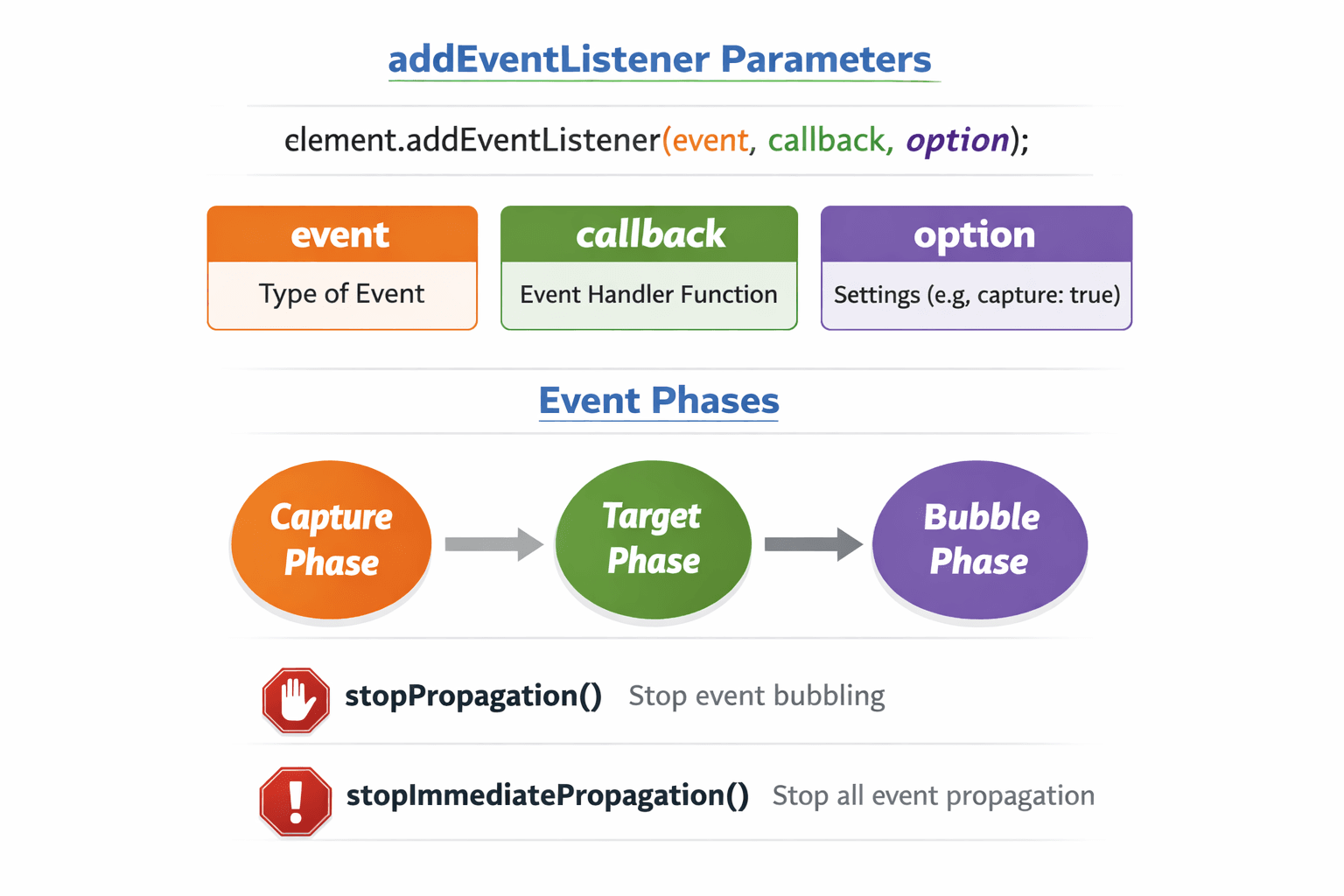
Every addEventListener provides three parameters:
eventcallbackoption
By default, the option is false. Hence, the bubbling phase travels from the target element up to the window, through the DOM tree (bottom → top direction).
Bubbling Phase (Default: false)
child.addEventListener('click', (e)=>{
  console.log(`I am from child || option false => bubbling phase`);
})

parent.addEventListener('click', ()=>{
  console.log(`I am from Parent || option false => bubbling phase`);
})

body.addEventListener('click', ()=>{
  console.log(`I am from Body || option false => bubbling phase `);
})
Every addEventListener provides three parameters:
event
callback
option
By default, the option is false. Hence, the bubbling phase travels from the target element up to the window, through the DOM tree (bottom → top direction).
Bubbling Phase (Default: false)
Output:
I am from child || option false => bubbling phase
I am from Parent || option false => bubbling phase
I am from Body || option false => bubbling phase
Stop Bubbling
To prevent bubbling upward, add e.stopPropagation() to the child.
The event will not be delegated to parent elements.
child.addEventListener('click', (e)=>{
  e.stopPropagation()
  console.log(`I am from child || option false => bubbling phase`);
})
Output:
I am from child || option false => bubbling phase
When to Use Bubbling (Default)
Implementing event delegation
Creating dropdowns that close when clicking outside
Most everyday event handling
Capturing Phase (option: true)
When we click on the target and keep the option true, the capturing phase is activated.
The event starts from the window and travels down to the target (top → bottom direction).
child.addEventListener('click', (e) => {
  console.log(`I am from Child || option true => capturing phase`);
}, true);

parent.addEventListener('click', (e) => {
  console.log(`I am from Parent || option true => capturing phase`);
}, true);

body.addEventListener('click', (e) => {
  console.log(`I am from Body || option true => capturing phase`);
}, true);
Output:
I am from Body || option true => capturing phase
I am from Parent || option true => capturing phase
I am from Child || option true => capturing phase
Stop Capturing
To stop the event from reaching the child, add e.stopPropagation() to the parent.
The event will stop at the parent.
parent.addEventListener('click', (e)=>{
  e.stopPropagation()
  console.log(`I am from Parent || option true => capturing phase`);
}, true)
Output:
I am from Body || option true => capturing phase
I am from Parent || option true => capturing phase
When to Use Capturing
You need to intercept events before they reach children
Implementing global event logging/debugging
Creating security layers (blocking certain clicks)
Stop Propagation Use Cases
Creating modals (click inside shouldn't close)
Implementing nested interactive elements
Preventing parent handlers from interfering
stopPropagation vs stopImmediatePropagation
stopImmediatePropagation ensures:
No other handlers on the same element run
The event doesn't bubble to the parent
Bigger problem:
What if multiple handlers are on the same element?
// e.stopImmediatePropagation(); // Overkill - stops analytics too!
Use stopPropagation() when:
Implementing modal close (click inside modal shouldn't close it)
Creating dropdown menus
Preventing parent handlers but keeping sibling handlers on the same element
Form validation where you still want analytics
Use stopImmediatePropagation() when:
Emergency/critical operations that must run alone
Security-related checks that should block other handlers
When you absolutely need to prevent any other code from running for this event
Debugging (temporarily to isolate event handlers)
Event Delegation

Event delegation is a technique where you attach a single event listener to a parent element instead of attaching multiple listeners to individual child elements.
The parent listens for events that bubble up from its children and handles them using event.target.
<ul id="todo-list">
  <li>Buy milk</li>
  <li>Walk dog</li>
  <li>Pay bills</li>
</ul>
// Good: Single listener on parent
document.getElementById('todo-list').addEventListener('click', (event) => {
  // event.target is the actual element clicked
  console.log('Clicked:', event.target.textContent);
});
Benefits of Event Delegation
One listener for all items (current AND future)
Better performance
Automatically handles dynamically added elements

Event delegation relies on event bubbling:
You click a child element
The event bubbles up through ancestors
The parent's listener catches it
Use
event.targetto identify which child was clicked