
How Git Works Internally
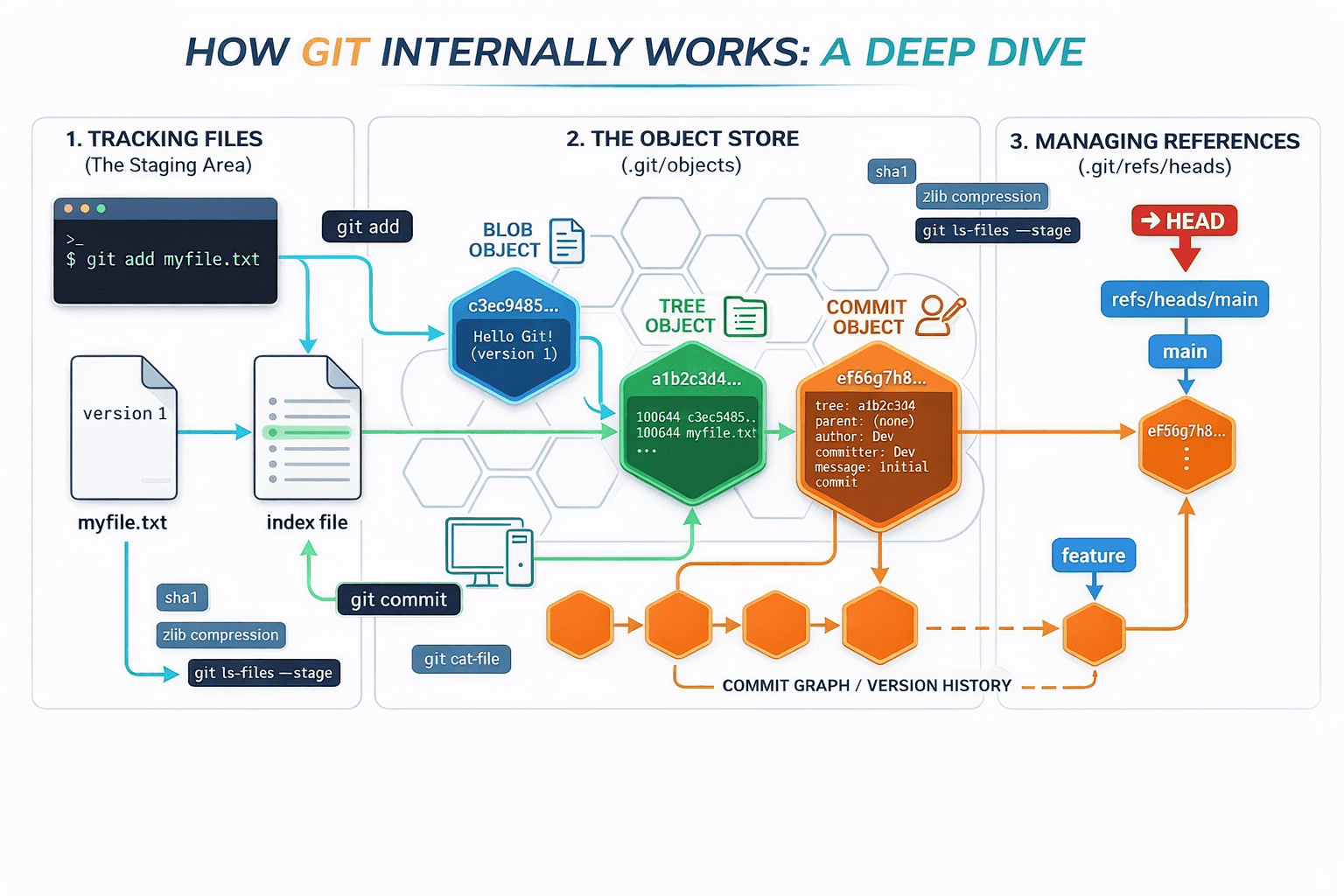
When we initialize a repository using git init, Git creates a hidden folder named .git. This folder is the private working area of Git and contains everything required to manage version control operations. All logs, objects, references, and internal metadata are stored here. Users are not expected to modify anything inside this folder manually, as Git fully manages it internally.
Whenever we run any Git command, Git interacts mainly with this .git directory. Internally, Git operates using a few core components such as objects, references, the index, and HEAD. Together, these components allow Git to track changes, store snapshots, and manage history efficiently.
When we run git add, Git does not create a commit. Instead, it creates a blob object inside the .git/objects directory. This blob contains the compressed content of the file. Along with this, Git updates the index file, which represents the staging area. The index stores a reference to the blob along with the file path and permissions.
if you check:
PS D:\learn-git\.git> ls

Mode                            LastWriteTime                                     Length Name

d-----                             02-01-2026 11:53                                   objects -

a----                                02-01-2026 11:55                                  50377 index
When we run:
git ls-files --stage
100644 c3ec9485502e1ed18716656679745698c55166d7 0
[100644] = file read/write permissionc3- first 2 letters are folder nameec9485502e1ed18716656679745698c55166d7- hash for reference
Inspecting the Staging Area
Running the command to see what is currently tracked in the index:
git ls-files --stage
Output:
100644 c3ec9485502e1ed18716656679745698c55166d7 0
When we do the commit, those changes in the COMMIT_EDITMSG, FETCH_HEAD, and index have been changed internally. If we check the refs and list its contents, we can observe that the heads has been changed.
Inspecting the branch ref
$ cat .git/refs/heads/master
ae730d610f225c0e273a1e8d3118bb2c8d7738c9
This is the commit hash. Git stores objects under .git/objects using the first two hex characters as a directory name and the remaining characters as the file name:
Folder:
aeFile:
730d610f225c0e273a1e8d3118bb2c8d7738c9
So the object lives at:
.git/objects/ae/730d610f225c0e273a1e8d3118bb2c8d7738c9
To inspect the commit object contents, use:
$ git cat-file -p ae730d610f225c0e273a1e8d3118bb2c8d7738c9
Example output:
tree 18f3e9eaadbaba2e008b2f3122872d6d0fa8c9b8
parent 39415af5f69cc2a93556f1528a8dab3c17e855b3
author Name
committer NAME 1767351121 +0530
Once you have the parent reference (and the commit object), you can:
Calculate diffs between commits
Run
git logto view historyRevert changes
Create branches from that commit
Merge histories using the commit as a merge base or ancestor
If we look inside this folder there are many pillars exists in this folder main as below
The Objects - in this folder git maintain the Blob, tree, and Commits, its database of entire project
This is very important If we delete this folder entire project history will gone.The Refs - This folder contain small files that act as a pointer.
refs/heads/*- this is git known where your branch start and endThe Head - This is not a folder its vital, compass, without this git can not know when the branch update when u run
git commitcommand.Index - this is important because its track the difference between your working directory and last commit.
Now lets check how Branch work internally.
when checked internally after creating the branch
.git/refs/heads/feature-auth
received hash
fd3aa67ed6f8e420472f3165e19292b4d158854e
Here what we observe that No files copied no directory duplicated, only a new pointer created.
here only HEAD is moving towards, so HEAD is key player to shift the current pointer to new branch
> cat .git/HEAD
ref: refs/heads/master

> git checkout feature-auth
Switched to branch 'feature-auth'
M      ion.js

> cat .git/HEAD
ref: refs/heads/feature-auth
When we delete the file
> git branch -d feature-auth
Deleted branch feature-auth (was fd3aa67).
Here only Delete the Branch Reference (Pointer)
git does not touch - to .git/objects, commit hashes, tree objects, blob objects
if you check git cat-file -p fd3aa67ed6f8e420472f3165e19292b4d158854e
> git cat-file -p fd3aa67ed6f8e420472f3165e19292b4d158854e
tree d6ead2f1cdfa63e132b77a2c832c5a7e8d545a64
parent ae730d610f225c0e273a1e8d3118bb2c8d7738c9
author racom> 1767359057 +0530
committer ram> 1767359057 +0530
This will keep as garbage collection will expire after 30 days.