
Node.js Architecture
Why Node.js Was Created
Ryan Dahl was inspired to create Node.js after seeing a file upload progress bar on Flickr. He realized that the browser didn’t know how much of the file had been uploaded without constantly asking the server.
He wanted to find a better, non-blocking way for servers to handle these kinds of tasks.
Ryan extracted the JavaScript engine (V8) from the browser. However, we cannot run the engine directly because it normally runs inside the browser environment.
That means we need some kind of base environment to run it.
For this purpose, C++ was used as the base layer.
Running JavaScript Outside the Browser
Now what does it mean to run JavaScript locally outside the browser?
If we only extract the V8 engine, we can run only the basic JavaScript functionality that belongs to the language itself, such as:
variables
functions
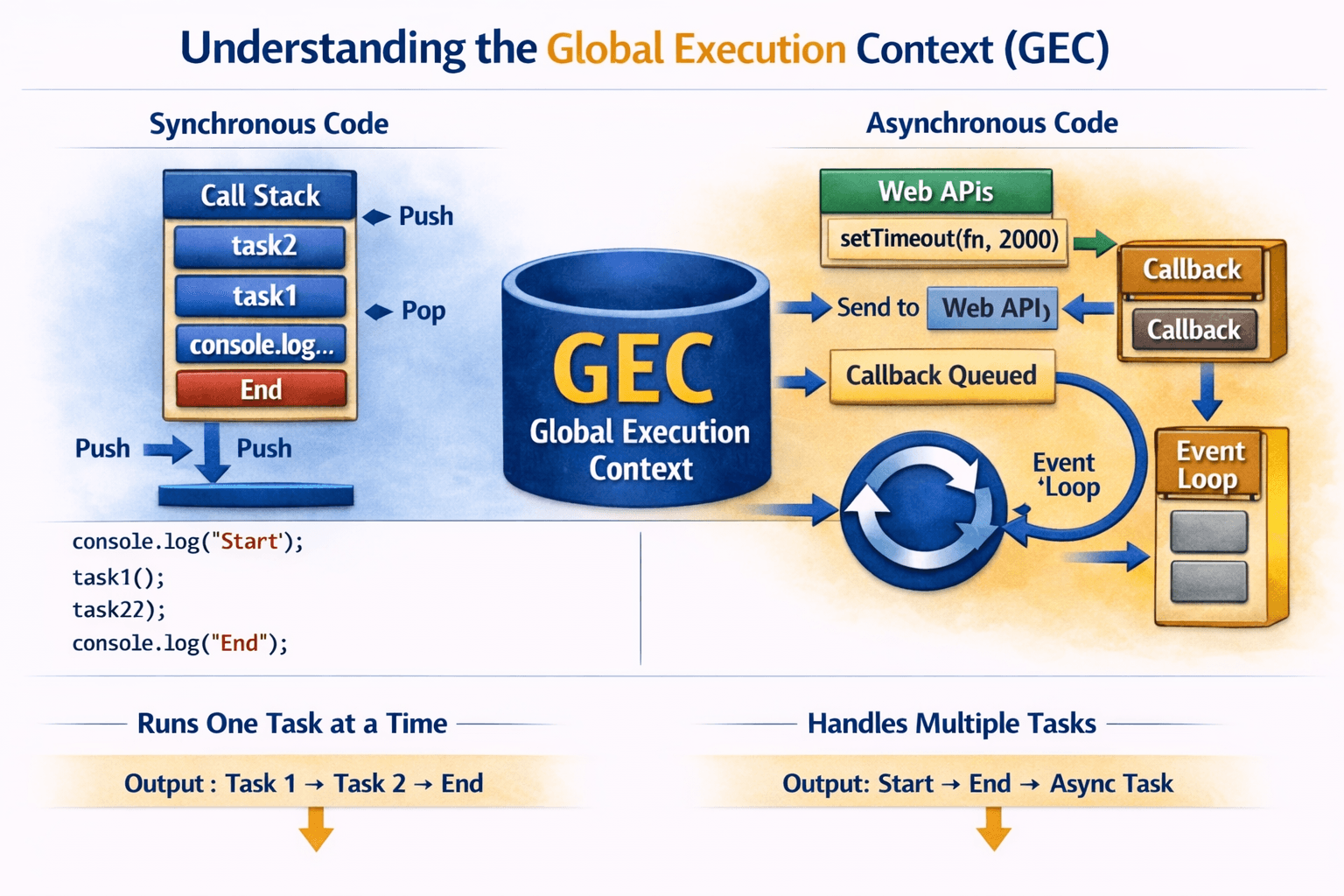
the call stack
However, many important features normally come from the browser environment, such as:
task queue
microtask queue
event loop
Web APIs
When Ryan tried running only the V8 engine, all these features were missing.
So extracting the V8 engine alone was not enough.
The Missing Piece: LibUV
To solve this problem, Ryan introduced LibUV.
LibUV is a C library that provides:
Event Loop
Thread Pool
Asynchronous I/O operations
This allowed JavaScript to handle non-blocking operations outside the browser.
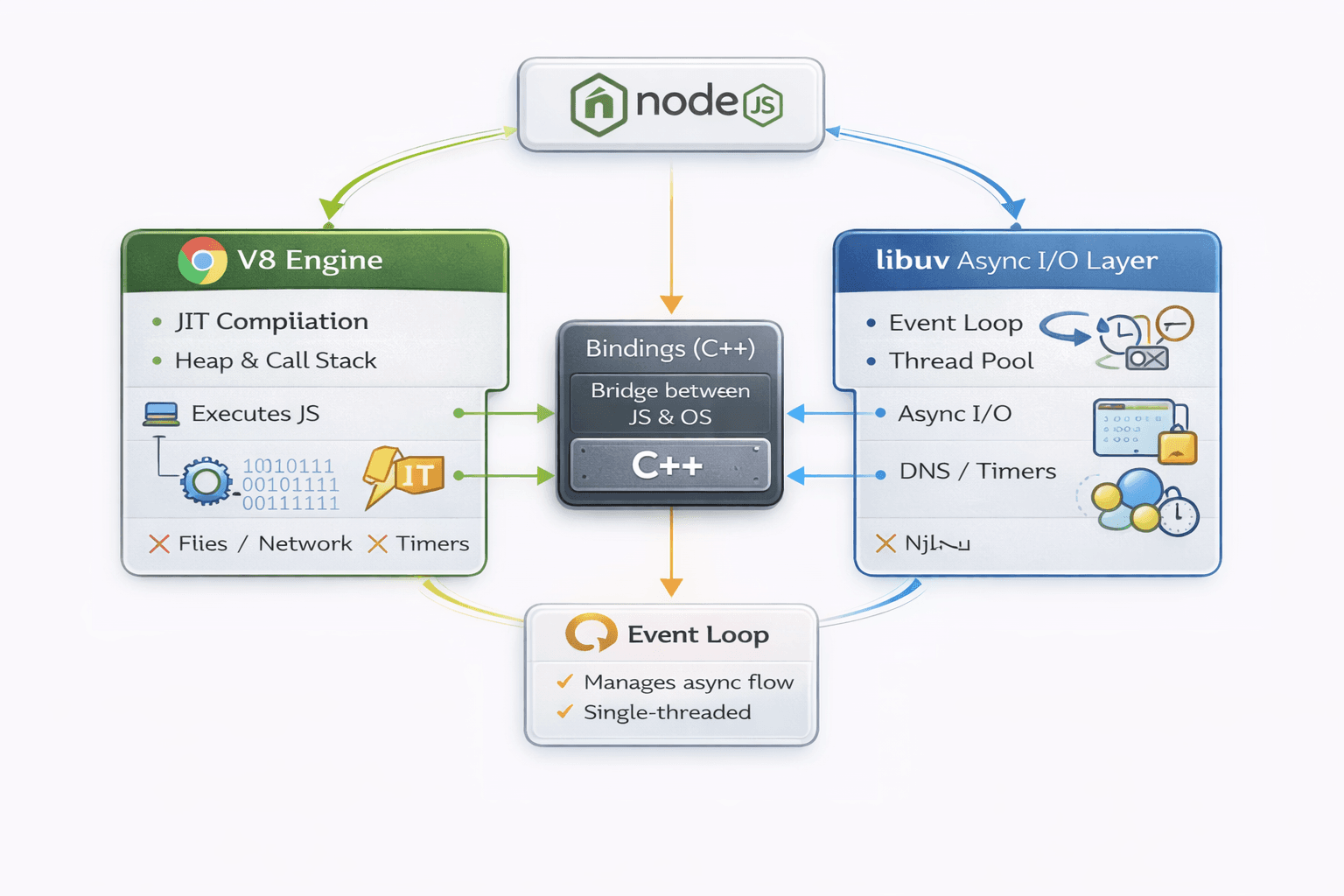
Node.js was created by combining three main components:
V8 Engine + C++ + LibUV = Node.js
V8 → Executes JavaScript code
C++ layer → Provides system-level bindings
LibUV → Handles asynchronous operations and the event loop

JavaScript vs Node.js Execution
Now let's check how Node.js works.
If you check in Node:
console.log('Hello')
You will get the result in the terminal.
But in the case of JavaScript, it requires running in the browser, i.e., Web APIs.
But the syntax for both is the same. The experience of the developer doesn't impact here; the only thing is that the internal workings are different.
How Node.js Executes Code Internally (Step-by-Step)
When we initialize a Node.js project and run a file, Node.js follows a specific execution flow. Understanding this flow helps us understand how the Event Loop works internally.
Let's go step by step.
Phase 1: Top-Level Code Execution (Synchronous Code)
First, Node.js executes the top-level code.
Top-level code means the code that is written outside of functions or any other scope. This code runs immediately.
console.log('Hello from Top Level Code');

const sum = 2 + 5;
console.log('sum', sum);
Other synchronous operations also execute here, such as:
Conditional statements (
if / else)Loops (
for,while)Variable declarations
Node.js finishes executing this synchronous code before moving forward.
Phase 2: Import Statements
Next, Node.js processes module imports.
import fs from 'fs';
During this phase Node loads the required modules so they can be used later in the program.
Phase 3: Event Callback Registration in Memory
In this phase, Node.js registers event callbacks in memory.
Example: handling a SIGINT signal.
SIGINT is triggered when a user presses Ctrl + C in the terminal.
If your process terminates before completing important work (like saving data), you may lose information. To avoid this, you can listen for the SIGINT event and perform cleanup tasks.
Example:
process.on('SIGINT', () => {
  console.log("Please do the cleanup");

  // close sockets
  // save unsaved data
  // complete pending work

  process.exit();
});
This allows your application to finish important operations before exiting.
If you want to learn more about process signals, you can read this article:
https://www.suse.com/c/observability-sigkill-vs-sigterm-a-developers-guide-to-process-termination/
Phase 4: Starting the Event Loop (Handled by LibUV)
After the initial setup, Node.js starts the Event Loop, which is handled internally by LibUV.
The event loop continuously checks for tasks that need to be executed.
Event Loop Phases
The event loop runs through several phases.
Step 1: Expired Callbacks (Timers Phase)
Why expired callbacks?
Node.js first executes the top-level code, which registers callback functions in memory.
Example:
setTimeout(
  () => console.log('Hello from SetTimeout 1'),
  0
);
Even though the timer is 0, the callback does not execute immediately.
Instead:
setTimeoutregisters the callback.The timer expires.
The event loop executes the callback in the timers phase.
That is why the event loop first checks for expired timer callbacks.
Step 2: I/O Polling (Input / Output)
In this phase, Node.js processes I/O operations, such as:
File system operations
Network requests
Database queries
If callbacks from these operations are ready, the event loop executes them here.
Step 3: setImmediate() Phase
Callbacks scheduled using setImmediate() are executed in this phase.
Example:
setImmediate(() => {
  console.log("Executed in setImmediate phase");
});
Step 4: Close Callbacks Phase
This phase executes callbacks related to closing resources, such as:
Closed sockets
Closed file handles
Event Loop Exit Condition
The event loop keeps running as long as there are pending tasks.
If Node.js finds:
No timers
No pending I/O
No callbacks
Then the event loop stops and the process exits.
Node.js Thread Pool (LibUV)
Node.js uses LibUV to manage asynchronous tasks.
LibUV provides a thread pool.
By default:
Thread Pool Size = 4
This pool is used for operations like:
File system tasks
DNS lookups
Some crypto operations
The size of the thread pool can be increased depending on the number of CPU cores available.
CPU Intensive Tasks in Node.js
In Node.js, when a CPU-intensive task occurs, the event loop does not execute it directly.
Examples of CPU-intensive tasks:
Cryptography
File system operations
Encryption / Hashing
DNS lookup
Compression
Instead, Node.js delegates these tasks to the LibUV thread pool.
The event loop continues running while worker threads process these tasks in the background.
This improves non-blocking performance.
How Node.js Handles Heavy Tasks
Think of Node.js like this:
Main Thread (Event Loop)
        │
        │ assigns heavy tasks
        ▼
Thread Pool (Worker Threads)
Flow:
User Request
      ↓
Event Loop
      ↓
CPU Intensive Task ?
      ↓
Yes → Send to Thread Pool
      ↓
Worker completes task
      ↓
Callback pushed to Event Loop
Example Code
Check the code below to understand this behaviour.
import fs from 'fs';

setTimeout(() => console.log('Hello from Timer'), 0);
setImmediate(() => console.log('Hello from Immediate'), 0);

fs.readFile('sample.txt', 'utf-8', function (err, data) {
  console.log(`File Reading Complete...`);
});

console.log('Hello from Top Level Code');
Possible output:
Hello from Top Level Code
Hello from Immediate
Hello from Timer
File Reading Complete... Immediate 2
Time 2
Time 3
Many times, the top-level setImmediate vs setTimeout race is unpredictable, so the order may change.
Another Example
Check the code below and try to guess the result.
import fs from 'fs'; import crypto from 'crypto';
const start = Date.now();
process.env.UV_THREADPOOL_SIZE = 4;
setTimeout(() => console.log('Hello from Timer'), 0); setImmediate(() => console.log('Hello from Immediate'), 0);
fs.readFile('sample.txt', 'utf-8', function (err, data) { console.log(File Reading Complete...);
setTimeout(() => console.log('Time 2'), 0); setTimeout(() => console.log('Time 3'), 0); setImmediate(() => console.log('Immediate 2'));
crypto.pbkdf2('password', 'salt', 300000, 1024, 'sha256', () => { console.log('Password 1 has been hashed', Date.now() - start); }); });
console.log('Hello from Top Level Code');
Example output:
Hello from Top Level Code
Hello from Immediate
Hello from Timer
File Reading Complete... Immediate 2
Time 2
Time 3
Password 1 has been hashed 5002 Thread Pool Example
In the code below, we run five cryptographic tasks to measure the execution time.
By default, the thread pool size is 4, which means only four tasks can run at the same time.
import crypto from 'crypto';
const start = Date.now();
crypto.pbkdf2('password', 'salt', 300000, 1024, 'sha256', () => { console.log('Password 1 has been hashed', Date.now() - start); });
crypto.pbkdf2('password', 'salt', 300000, 1024, 'sha256', () => { console.log('Password 2 has been hashed', Date.now() - start); });
crypto.pbkdf2('password', 'salt', 300000, 1024, 'sha256', () => { console.log('Password 3 has been hashed', Date.now() - start); });
crypto.pbkdf2('password', 'salt', 300000, 1024, 'sha256', () => { console.log('Password 4 has been hashed', Date.now() - start); });
crypto.pbkdf2('password', 'salt', 300000, 1024, 'sha256', () => { console.log('Password 5 has been hashed', Date.now() - start); });
Example output:
Password 1 has been hashed 390
Password 2 has been hashed 391
Password 3 has been hashed 400
Password 4 has been hashed 437
Password 5 has been hashed 582
If we check the result of the above code, the 5th task takes more time compared to the first four tasks.
This happens because the thread pool can run only four tasks at the same time.
So the 5th task starts only after one of the first four tasks is completed, meaning a worker thread becomes free and picks up the 5th task.
setImmediate() vs setTimeout()
setImmediate() and setTimeout() are similar but behave differently depending on when they are called.
For example, if we run the following script outside an I/O cycle:
import fs from 'fs';
setTimeout(() => console.log('Hello from Timer'), 0); setImmediate(() => console.log('Hello from Immediate'), 0);
The execution order is not guaranteed.
Inside an I/O Cycle
If we move these calls inside an I/O operation, the setImmediate() callback always executes first.
import fs from 'fs';
fs.readFile("__filename", () => { setTimeout(() => { console.log('timeout'); }, 0);
setImmediate(() => { console.log('immediate'); }); });
The main advantage of setImmediate() over setTimeout() is that setImmediate() will always be executed before timers when scheduled inside an I/O cycle, regardless of how many timers are present.
Key Insight
Node.js is not single-threaded internally.
Only the JavaScript execution runs on a single thread.
Behind the scenes, Node.js uses:
LibUV thread pool
Operating system threads
Event-driven architecture
This allows Node.js to handle thousands of concurrent operations efficiently.
Summary
Node.js achieves non-blocking performance using three main components:
V8 Engine → Executes JavaScript
C++ Layer → Connects system APIs
LibUV → Handles Event Loop & Thread Pool
Thread pool default size:
UV_THREADPOOL_SIZE = 4
Heavy operations like crypto, file system, and DNS run in this pool.