
Understanding Objects in JavaScript
1. What objects are and why they are needed ?
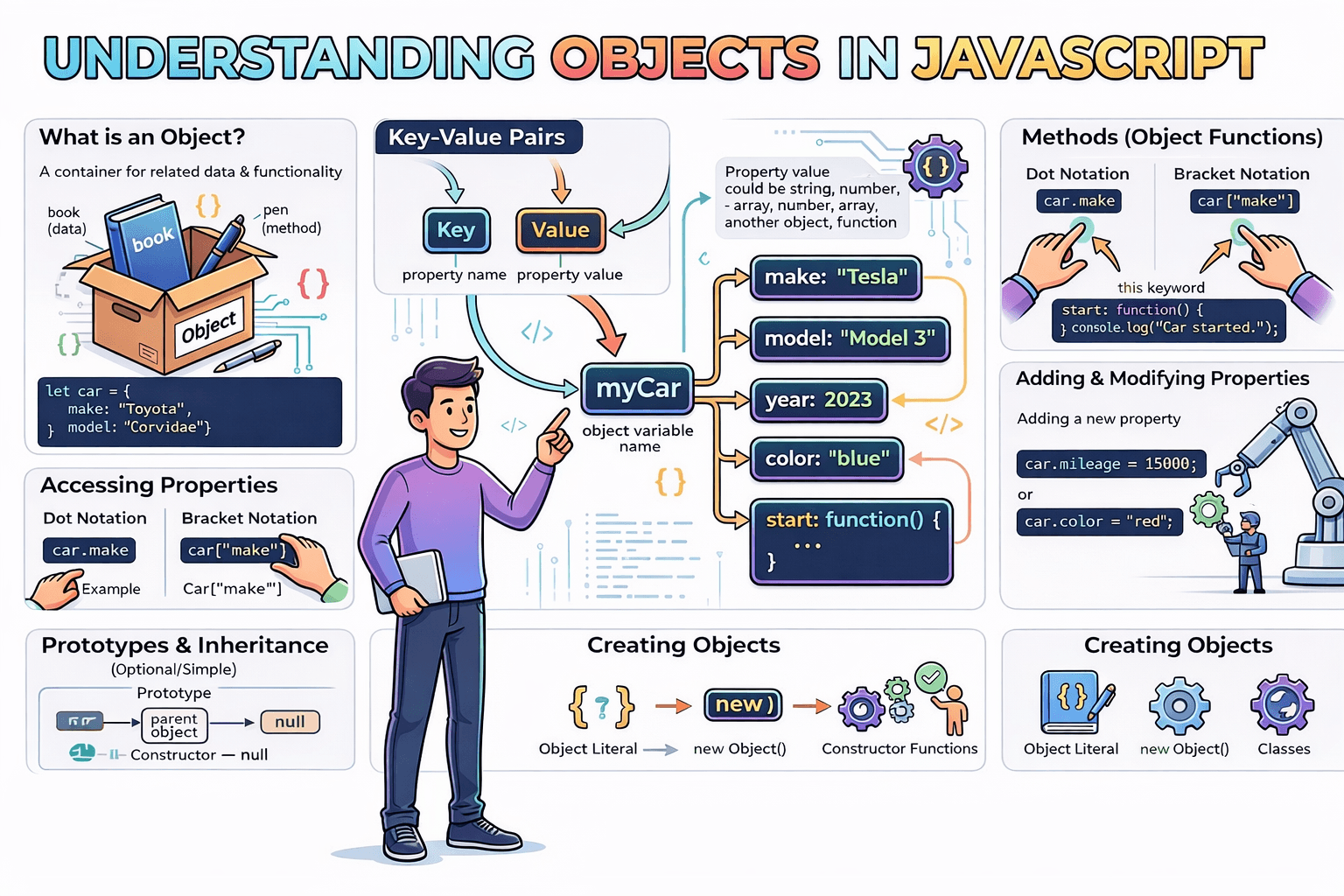
Object is structure that help us group related data and functions together to perform and manage the program
When we write data between two curly braces {}, we create an object. Objects store data in the form of key-value pairs (also called properties).
Why do we need objects?
Organization: Objects group related data together
Real-world modeling: They represent real-world entities (a user, a product, a car)
Reusability: Create blueprints for creating multiple similar objects
Readability: Code becomes more meaningful and self-documenting
Flexibility: Can hold different types of data including functions (methods)
2. Creating objects ?
- Object Literal {} (Most Common)
We can store the student information in form of student object
const student = {
  name: "Amit",
  age: 18,
  grade: "A"
};
2.Using new Object() Constructor
const person = new Object();
person.name = "John";
person.age = 30;
person.greet = function() {
  console.log(`Hello, I'm ${this.name}`);
};
3.Constructor Function (Traditional way)
function Person(name, age) {
  this.name = name;
  this.age = age;
  this.greet = function() {
    console.log(`Hello, I'm ${this.name}`);
  };
}

const john = new Person("John", 30);
const jane = new Person("Jane", 25);
4. ES6 Classes (Modern way)
class Person {
  constructor(name, age) {
    this.name = name;
    this.age = age;
  }

  greet() {
    console.log(`Hello, I'm ${this.name}`);
  }
}

const john = new Person("John", 30);

const personPrototype = {
  greet() {
    console.log(`Hello, I'm ${this.name}`);
  }
};
5. Object.create()
const john = Object.create(personPrototype);
john.name = "John";
john.age = 30;

// OR with properties
const jane = Object.create(personPrototype, {
  name: { value: "Jane", writable: true },
  age: { value: 25, writable: true }
});
6. Factory Functions
function createPerson(name, age) {
  return {
    name,
    age,
    greet() {
      console.log(`Hello, I'm ${this.name}`);
    }
  };
}

const john = createPerson("John", 30);
const jane = createPerson("Jane", 25);
Comparing Object
// different objects (same shape, different references)
const a = { name: "Ravi" };
const b = { name: "Ravi" };

console.log(a === b); // false
Explanation:
In JavaScript objects are compared by reference, not by their content.
aandbabove are two distinct objects in memory (two different references), soa === bisfalse.JavaScript does not expose memory addresses, but conceptually they point to different locations.
// same reference assigned
const a = { name: "Ravi" };
const b = a;

console.log(a === b); // true

// modifying via one reference affects the other
b.name = "Raj";
console.log(a.name); // "Raj"
Key points:
b = acopies the reference, not the object. Both variables now refer to the exact same object.===(andObject.is) for objects checks whether the references are identical.For primitives (strings, numbers, booleans, null, undefined, symbols), equality compares values, not references.
Summary:
Two separately created objects with identical contents are not equal (different references).
Assigning one object to another variable makes them the same reference, so equality is true and mutations via either variable affect the same object.
3. Accessing properties?
function Person(name, age) {
  this.name = name;
  this.age = age;
  this.greet = function() {
    console.log(`Hello, I'm ${this.name}`);
  };
}

const john = new Person("John", 30);
const jane = new Person("Jane", 25);

const student = {
  name: "Amit",
  age: 18,
  grade: "A"
};

console.log(student.name);
console.log(student["name"]);
console.log(Object.keys(student));
console.log(Object.values(john))
4. Updating object properties ?
Before the updating object property, its best practice to create the shallow copy if object is nested use deepcopy strucutureClone()
function Paan(type, price) {
  this.type = type;
  this.price = price;
  this.greet = function() {
    console.log(`Tyep of paan is  ${this.name}`);
  };
}

const basePaan = new Paan("kapoori", 20);
const methaPaan = new Paan("meetha", 30);

const copyBasePaan = {...basePaan}

basePaan === copyBasePaan // return false || different memory location

copyBasePaan.price = 45
console.log(Object.values(copyBasePaan));
When we require the Creating constants (non-writable properties) Hiding properties from loops and Preventing deletion of important properties (non-configurable) defineProperty method works
Object.defineProperty(student, 'grade', {
  value: 'A',
  writable: true,  // Can be updated
  enumerable: true, // Will appear in loops
  configurable: true // Can be deleted/reconfigured
});
5. Adding and deleting properties ?
function Paan(type, price) {
  this.type = type;
  this.price = price;
  this.greet = function() {
    console.log(`Tyep of paan is  ${this.name}`);
  };
}

const basePaan = new Paan("kapoori", 20);
const customizePaan = {price : 50}
const newOrder = Object.assign({}, basePaan, customizePaan);
Update property Using Spread Operator
const updatedStudent = {
  ...student,
  name: "Raj",
  age: 19,
  city: "Mumbai"
};
merge 2 objects
const merged = { ...obj1, ...obj2 };
obj2 value will be final, if I want to keep the value with obj1, Change the order. The later object wins. That’s the rule.
For deep merge, you must manually merge nested objects or use libraries like lodash.merge.
Delete property
const { grade, phone, ...studentWithoutSensitive } = student;

console.log("studentWithoutSensitive", studentWithoutSensitive);
delete updatedStudent.city
delete updatedStudent["age"]
console.log("updatedStudent", updatedStudent);

student.grade = undefined;
student.phone = null;

console.log(student); // Original unchanged
6. Looping through object keys ?
const student = {
  name: "Amit",
  age: 18,
  grade: "A"
};

for(const [key, val ] of Object.entries(student)){
  console.log(key);
}
Object.keys(student).map((val, idx)=>{
  console.log(val);
})
7. How can merge 2 Object
const merged = { ...obj1, ...obj2 };
obj2 value will be final, if I want to keep the value with obj1, Change the order. The later object wins. That’s the rule.
For deep merge, you must manually merge nested objects or use libraries like lodash.mer.
8. What are the difference Object.Seal and Object.freez() ?
Object.freeze() ❌ Cannot add new properties
❌ Cannot delete properties
❌ Cannot modify existing properties
❌ Cannot change property descriptors
👉 Object becomes fully read-only (shallow).
but it works in nested object
const artifact = {
  name: "Obsidian Crown",
  era: "Ancient",
  value: 50000,
  material: "volcanic glass",
  user: { name: "Ravi" }
};
const freez = Object.freeze(artifact);
// artifact.name = "Deep"
console.log(artifact);
artifact.user.name = "Deep"
console.log(freez);
Object.seal(obj)
❌ Cannot add new properties
❌ Cannot delete properties
✅ CAN modify existing properties
❌ Cannot change property descriptors
So nested objects are NOT automatically frozen/sealed.
To handle nested objects, we must do deep freeze or deep seal.
Solution: Recursive Deep Freeze
We must freeze:
The main object
Every nested object inside it
Recursively
9. What are the difference between Arrays and Objects
Arrays vs Objects in JavaScript: Key Differences
1. Syntax & Structure
// ARRAY - Ordered list
const fruits = ["apple", "banana", "orange"];
// OBJECT - Key-value pairs
const person = { name: "Amit", age: 25, city: "Delhi"};
2. Accessing Values
// ARRAY - Access by index (0-based)
const colors = ["red", "green", "blue"];
console.log(colors[0]); // "red"
// OBJECT - Access by key
const car = {
  brand: "Toyota",
  model: "Camry",
  year: 2023
};
console.log(car.brand);     // "Toyota" (dot notation)
console.log(car["model"]);  // "Camry" (bracket notation)
3. Adding/Removing Items
// ARRAY
const numbers = [1, 2, 3];

// Add
numbers.push(4);        // End: [1, 2, 3, 4]
numbers.unshift(0);      // Start: [0, 1, 2, 3, 4]

// Remove
numbers.pop();           // Removes last: [0, 1, 2, 3]
numbers.shift();         // Removes first: [1, 2, 3]
// OBJECT
const user = {
  name: "Raj",
  age: 30
};

// Add
user.email = "raj@email.com";     // { name: "Raj", age: 30, email: "raj@email.com" }
user["phone"] = "1234567890";      // Add with bracket notation

// Remove
delete user.age;                    // { name: "Raj", email: "raj@email.com", phone: "1234567890" }
4. Length/Size
// ARRAY - Has built-in length property
const items = ["pen", "book", "laptop"];
console.log(items.length); // 3
// OBJECT - No built-in length
const student = {
  name: "Priya",
  grade: "A",
  subject: "Math"
};
console.log(student.length); // undefined

// Need to use Object.keys()
console.log(Object.keys(student).length); // 3
console.log(Object.values(student).length); // 3
console.log(Object.entries(student).length); // 3
5. Iteration Methods
// ARRAY - Multiple iteration methods
const cities = ["Mumbai", "Delhi", "Bangalore"];

// for loop
for (let i = 0; i < cities.length; i++) {
  console.log(cities[i]);
}

// forEach
cities.forEach(city => console.log(city));

// map (returns new array)
const upperCities = cities.map(city => city.toUpperCase());

// filter
const longNames = cities.filter(city